---
title: Adding contacts
description: There are several ways that you can add contacts to your Respond Flow account
---
[Skip to content](https://sales.textvolt.com/migration/knowledge/how-to-add#main-content)
English
Show submenu for translations
![Volt-LogoBuildout-Digital-Black-01-4.png\]](https://sales.textvolt.com/hs-fs/hubfs/Volt-LogoBuildout-Digital-Black-01-4.png?height=50&name=Volt-LogoBuildout-Digital-Black-01-4.png)
- [Default HubSpot Blog](https://respondflow-1.hubspotpagebuilder.com/blog)
Open main navigation
Close main navigation
- [Default HubSpot Blog](https://respondflow-1.hubspotpagebuilder.com/blog)
- English
Show submenu for translations
- Go to textvolt.com
Go to textvolt.com
Hello! How can we help you?
- There are no suggestions because the search field is empty.
1. [Help Center](https://sales.textvolt.com/migration/knowledge?hsLang=en)
2. [Getting Started with Volt](https://sales.textvolt.com/migration/knowledge/getting-started-with-volt?hsLang=en)
# Adding contacts
## There are several ways that you can add contacts to your Respond Flow account
### **Getting Started**
Ready to add contacts to your Respond Flow account? This article will dive into the various methods you can use for adding contacts or contact collection. If you have any questions that this article cannot answer, don't hesitate to contact a support rep.
### Uploading contacts using a CSV spreadsheet
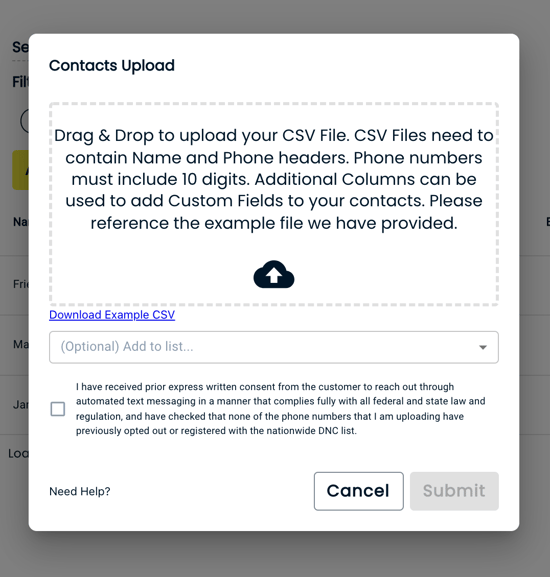
This is the primary and most popular method for uploading contacts. To upload contacts via a CSV you must first make sure your CSV is formatted correctly. For formatting instructions download our [example file.](https://respondflow-static.s3.amazonaws.com/examples/CSV+Example+File+-+Sheet1.csv)
*The two required columns are "Name" and "Phone". The upload will not work correctly unless the first two headers match that exactly. *
*Every column after that will be used to add Custom Fields. If you need help with custom fields please refer to this [article.](https://help.respondflow.com/knowledge/what-is-a-custom-field-1)*
Once you are on the *Contacts* page you will select "actions" and then click "upload contacts". This will prompt you to choose a list. If you do not choose a specific list your contacts will only be uploaded into the ALL list. Drag and Drop the file or choose one from your computer and then hit SUBMIT. You will then receive an email regarding the status of your upload.
### **External Signup Link**
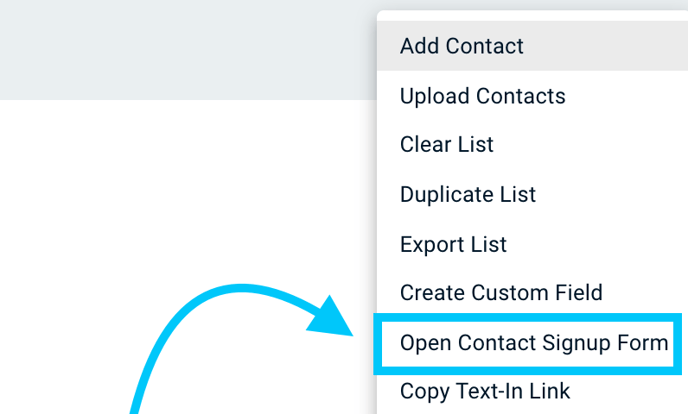
If you have already uploaded a CSV of your current contacts and want to continue increasing subscriber count, then the External Signup Link is for you!! This link allows you to display a form in-store or on your website for collecting numbers. You can find the link for your account under "actions" on the contacts page. Check out this image if you need help locating it.
### **Adding contacts to the app one by one**
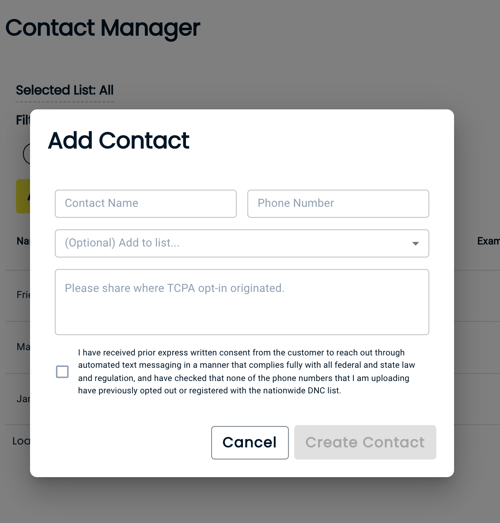
If you would like to add additional contacts one by one. You can start by clicking "actions" in the top right section of our Contact Manager page. From here you will select "add contact". This will pop up a window for you to fill in the relevant information.

- [Getting Started with Volt](https://sales.textvolt.com/migration/knowledge/getting-started-with-volt?hsLang=en)
- [How to](https://sales.textvolt.com/migration/knowledge/how-to?hsLang=en#main-content)
- [Contact Manager](https://sales.textvolt.com/migration/knowledge/how-to?hsLang=en#contact-manager)
- [Waves & Conversations](https://sales.textvolt.com/migration/knowledge/how-to?hsLang=en#waves-conversations)
- [Flows](https://sales.textvolt.com/migration/knowledge/how-to?hsLang=en#flows)
- [Settings and Configuration](https://sales.textvolt.com/migration/knowledge/how-to?hsLang=en#settings-and-configuration)
- [FAQs](https://sales.textvolt.com/migration/knowledge/faqs?hsLang=en)
- [Integrations and API](https://sales.textvolt.com/migration/knowledge/integrations-and-api?hsLang=en#main-content)
- [Zapier](https://sales.textvolt.com/migration/knowledge/integrations-and-api?hsLang=en#zapier)
- [Text Strategy](https://sales.textvolt.com/migration/knowledge/text-strategy?hsLang=en)
- [Compliance](https://sales.textvolt.com/migration/knowledge/compliance?hsLang=en)
- [Default HubSpot Blog](https://respondflow-1.hubspotpagebuilder.com/blog)
[](https://textvolt.com)
Help Center
Copyright © 2026, Volt