---
title: How to change user permissions
description: Adding and removing permissions for people in your organization
---
[Skip to content](https://sales.textvolt.com/migration/knowledge/how-to-change-user-permissions#main-content)
English
Show submenu for translations
![Volt-LogoBuildout-Digital-Black-01-4.png\]](https://sales.textvolt.com/hs-fs/hubfs/Volt-LogoBuildout-Digital-Black-01-4.png?height=50&name=Volt-LogoBuildout-Digital-Black-01-4.png)
- [Default HubSpot Blog](https://respondflow-1.hubspotpagebuilder.com/blog)
Open main navigation
Close main navigation
- [Default HubSpot Blog](https://respondflow-1.hubspotpagebuilder.com/blog)
- English
Show submenu for translations
- Go to textvolt.com
Go to textvolt.com
Hello! How can we help you?
- There are no suggestions because the search field is empty.
1. [Help Center](https://sales.textvolt.com/migration/knowledge?hsLang=en)
2. [How to](https://sales.textvolt.com/migration/knowledge/how-to?hsLang=en)
3. [Settings and Configuration](https://sales.textvolt.com/migration/knowledge/how-to?hsLang=en#settings-and-configuration)
# How to change user permissions
## Adding and removing permissions for people in your organization
### **In this article, we will discuss how to change user permissions within Respond Flow. This will be conducted under the "settings" tab. You should navigate there now if you are currently on the dashboard!**
### **1. Click on the "settings" icon.** ⚙️
This is located at the top-right of the Dashboard.
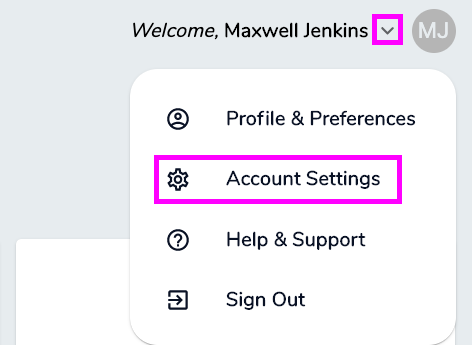
### **2. Navigate to the "users" section within the "settings" tab.**
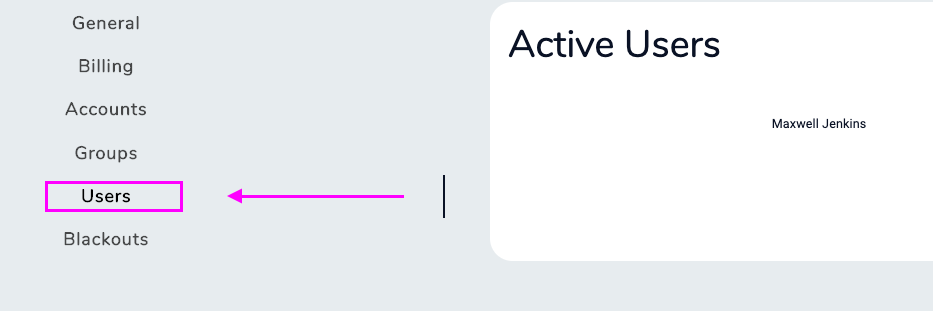
This little section will have all of your different users contained under it. You can also add new users here!
### **3. "Click" the user whose permissions are going to be edited.** 📍
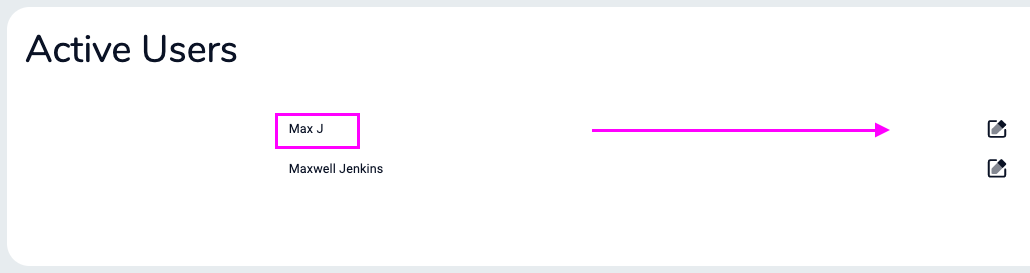
Note: You cannot edit the account owner's permissions as they have every single one. If you are reading this tutorial, that is most likely you!
### **4. Add or remove specific user permissions!** 🚫
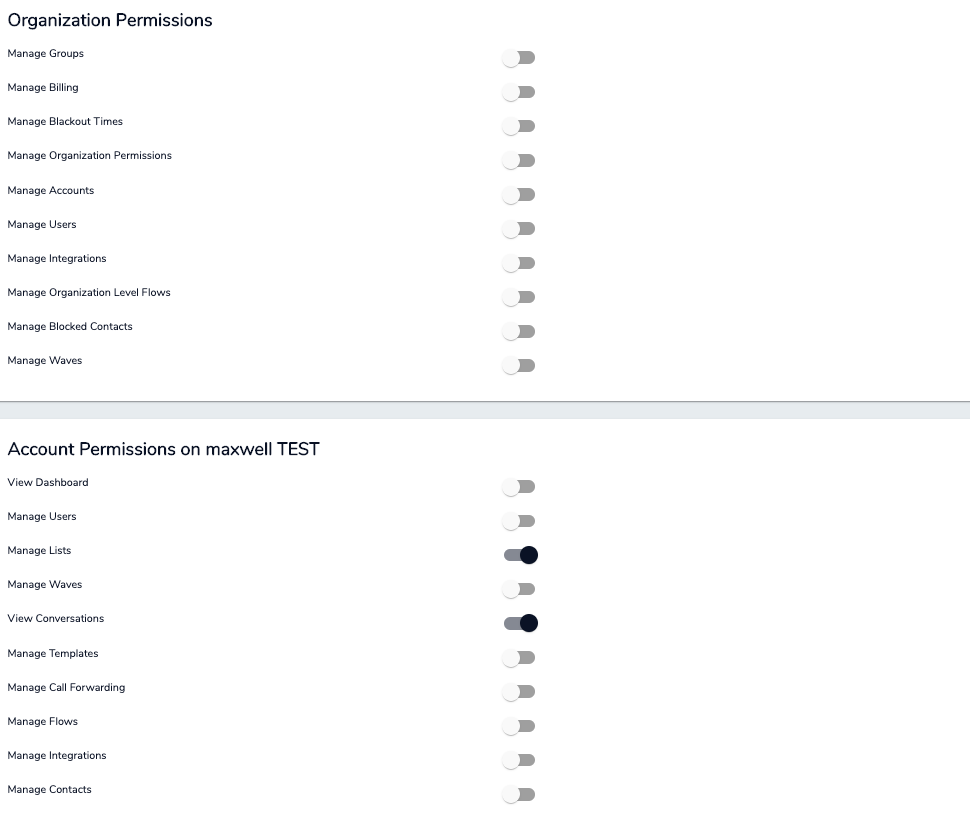
Organization permissions concern the entire company as a whole. Account permissions are limited to that specific location and phone number. If you only have one number don't worry about organization permissions until you add another one.
### **Now that we have completed this article, you will be able to manage every single action that your users are capable of performing. If you accidentally give someone too many permissions, you can always take it away here as well. Check out the help desk for more awesome content. Hope that helps! 📈 😎**
Did this answer your question?
- [Getting Started with Volt](https://sales.textvolt.com/migration/knowledge/getting-started-with-volt?hsLang=en)
- [How to](https://sales.textvolt.com/migration/knowledge/how-to?hsLang=en#main-content)
- [Contact Manager](https://sales.textvolt.com/migration/knowledge/how-to?hsLang=en#contact-manager)
- [Waves & Conversations](https://sales.textvolt.com/migration/knowledge/how-to?hsLang=en#waves-conversations)
- [Flows](https://sales.textvolt.com/migration/knowledge/how-to?hsLang=en#flows)
- [Settings and Configuration](https://sales.textvolt.com/migration/knowledge/how-to?hsLang=en#settings-and-configuration)
- [FAQs](https://sales.textvolt.com/migration/knowledge/faqs?hsLang=en)
- [Integrations and API](https://sales.textvolt.com/migration/knowledge/integrations-and-api?hsLang=en#main-content)
- [Zapier](https://sales.textvolt.com/migration/knowledge/integrations-and-api?hsLang=en#zapier)
- [Text Strategy](https://sales.textvolt.com/migration/knowledge/text-strategy?hsLang=en)
- [Compliance](https://sales.textvolt.com/migration/knowledge/compliance?hsLang=en)
- [Default HubSpot Blog](https://respondflow-1.hubspotpagebuilder.com/blog)
[](https://textvolt.com)
Help Center
Copyright © 2026, Volt
```json
{
"@context" : "https://schema.org",
"@type" : "VideoObject",
"contentUrl" : "https://6521204.fs1.hubspotusercontent-na1.net/hubfs/6521204/How%20to%20Edit%20User%20Permissions.mp4",
"dateModified" : "2022-05-27T10:39:24.950Z",
"description" : "",
"duration" : "PT1M1S",
"height" : 720,
"name" : "How to Edit User Permissions",
"thumbnailUrl" : "https://6521204.fs1.hubspotusercontent-na1.net/hubfs/6521204/How%20to%20Edit%20User%20Permissions.mp4/medium.jpg",
"uploadDate" : "2020-12-07T18:49:34.214Z",
"width" : 1280
}
```