---
title: How to set up your account location
description: Setting up your account location to include address in texts
---
[Skip to content](https://sales.textvolt.com/migration/knowledge/how-to-set-up-your-account-location#main-content)
English
Show submenu for translations
![Volt-LogoBuildout-Digital-Black-01-4.png\]](https://sales.textvolt.com/hs-fs/hubfs/Volt-LogoBuildout-Digital-Black-01-4.png?height=50&name=Volt-LogoBuildout-Digital-Black-01-4.png)
- [Default HubSpot Blog](https://respondflow-1.hubspotpagebuilder.com/blog)
Open main navigation
Close main navigation
- [Default HubSpot Blog](https://respondflow-1.hubspotpagebuilder.com/blog)
- English
Show submenu for translations
- Go to textvolt.com
Go to textvolt.com
Hello! How can we help you?
- There are no suggestions because the search field is empty.
1. [Help Center](https://sales.textvolt.com/migration/knowledge?hsLang=en)
2. [How to](https://sales.textvolt.com/migration/knowledge/how-to?hsLang=en)
3. [Settings and Configuration](https://sales.textvolt.com/migration/knowledge/how-to?hsLang=en#settings-and-configuration)
# How to set up your account location
## Setting up your account location to include address in texts
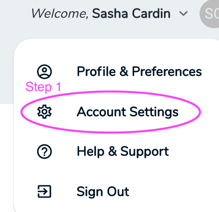
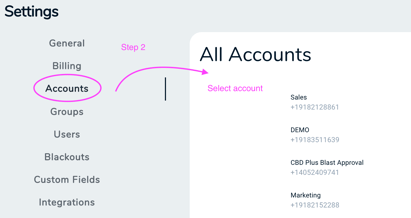
In the upper right corner of your screen select *Account Settings* from the dropdown then in *Settings * select *Accounts * and choose the account you want to edit
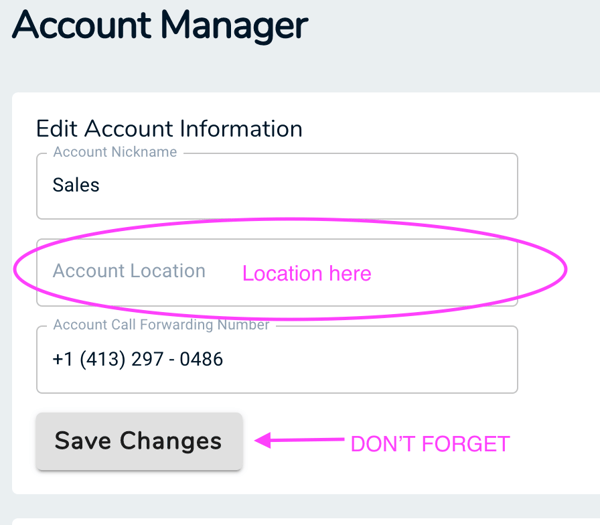
Once you are in the *Account Manager* you will scroll down to input your account location and then click save.
- [Getting Started with Volt](https://sales.textvolt.com/migration/knowledge/getting-started-with-volt?hsLang=en)
- [How to](https://sales.textvolt.com/migration/knowledge/how-to?hsLang=en#main-content)
- [Contact Manager](https://sales.textvolt.com/migration/knowledge/how-to?hsLang=en#contact-manager)
- [Waves & Conversations](https://sales.textvolt.com/migration/knowledge/how-to?hsLang=en#waves-conversations)
- [Flows](https://sales.textvolt.com/migration/knowledge/how-to?hsLang=en#flows)
- [Settings and Configuration](https://sales.textvolt.com/migration/knowledge/how-to?hsLang=en#settings-and-configuration)
- [FAQs](https://sales.textvolt.com/migration/knowledge/faqs?hsLang=en)
- [Integrations and API](https://sales.textvolt.com/migration/knowledge/integrations-and-api?hsLang=en#main-content)
- [Zapier](https://sales.textvolt.com/migration/knowledge/integrations-and-api?hsLang=en#zapier)
- [Text Strategy](https://sales.textvolt.com/migration/knowledge/text-strategy?hsLang=en)
- [Compliance](https://sales.textvolt.com/migration/knowledge/compliance?hsLang=en)
- [Default HubSpot Blog](https://respondflow-1.hubspotpagebuilder.com/blog)
[](https://textvolt.com)
Help Center
Copyright © 2026, Volt
```json
{
"@context" : "https://schema.org",
"@type" : "VideoObject",
"contentUrl" : "https://6521204.fs1.hubspotusercontent-na1.net/hubfs/6521204/How%20to%20setup%20Account%20Location.mp4",
"dateModified" : "2022-05-27T10:39:15.935Z",
"duration" : "PT1M15S",
"height" : 720,
"name" : "How to setup Account Location",
"thumbnailUrl" : "https://6521204.fs1.hubspotusercontent-na1.net/hubfs/6521204/How%20to%20setup%20Account%20Location.mp4/medium.jpg",
"uploadDate" : "2020-12-04T20:56:22.751Z",
"width" : 1280
}
```