---
title: Sending Your First Wave
description: Learn how to send a text to a large number of contacts at once. Also known as a "mass message" or "text blast".
---
[Skip to content](https://sales.textvolt.com/migration/knowledge/send-a-wave#main-content)
English
Show submenu for translations
![Volt-LogoBuildout-Digital-Black-01-4.png\]](https://sales.textvolt.com/hs-fs/hubfs/Volt-LogoBuildout-Digital-Black-01-4.png?height=50&name=Volt-LogoBuildout-Digital-Black-01-4.png)
- [Default HubSpot Blog](https://respondflow-1.hubspotpagebuilder.com/blog)
Open main navigation
Close main navigation
- [Default HubSpot Blog](https://respondflow-1.hubspotpagebuilder.com/blog)
- English
Show submenu for translations
- Go to textvolt.com
Go to textvolt.com
Hello! How can we help you?
- There are no suggestions because the search field is empty.
1. [Help Center](https://sales.textvolt.com/migration/knowledge?hsLang=en)
2. [Getting Started with Volt](https://sales.textvolt.com/migration/knowledge/getting-started-with-volt?hsLang=en)
# Sending Your First Wave
## Learn how to send a text to a large number of contacts at once. Also known as a "mass message" or "text blast".
### Video Tutorial
### Step by Step Tutorial
With Waves, you can send mass text messages to a list or multiple lists of contacts. If you want to customize your Wave, read [this](https://6521204.hs-sites.com/en/knowledge/how-to-create-a-template?hsLang=en) article on how to create a template.
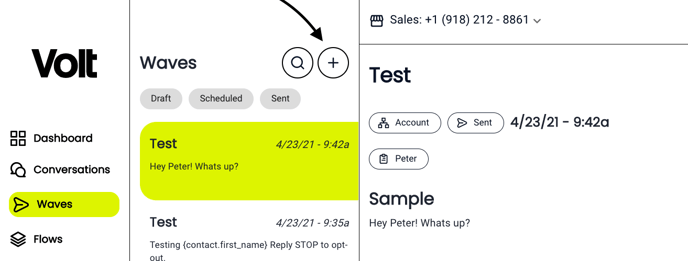
On the sidebar menu, click the Waves icon to access the Waves Section. Then click on the "+" to create a New Wave.
Step #1: Name your Wave for internal purposes.
Step #2: You’ll need to choose if you want to send the wave to one "Account" or to a "Group".
Step #3: Decide whether you would like to use a templated message or craft a custom one.
Step #4: Decide when you want the message to go out. You may send it immediately or schedule it for later.
Step #5: Hit the yellow "CREATE" button at the top right of your screen and watch the responses roll in!! If you are not ready to send it and want to see a preview of the message, you may save the message as a "Draft" instead. 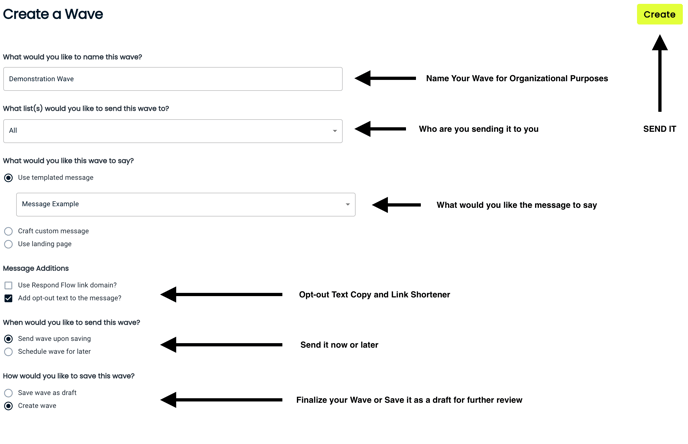**Pro Tip:** You can schedule multiple messages at once to minimize your daily workload!
### Wave Analytics
Volt will provide you with a campaign-specific deliverability report for each individual Wave you send out!! Here is a screenshot that shows what our Message Status Report provides. The Report will tell you about individual message cost, the number of contacts involved, and the deliverability rate. 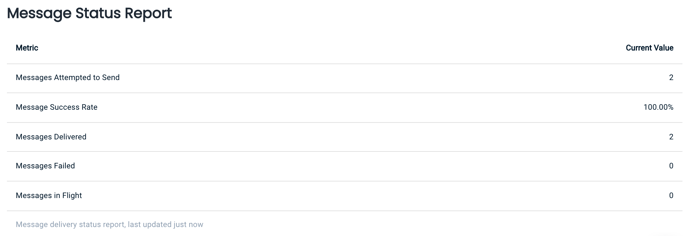
- Messages attempted to send - Total amount of attempted messages.
- Message Success Rate - % of successful messages
- Messages Delivered - Number of texts delivered.
- Messages Failed - Number of messages that failed.
- Messages in-flight - Messages that are currently in the process of sending.

**help@textvolt.com**
- [Getting Started with Volt](https://sales.textvolt.com/migration/knowledge/getting-started-with-volt?hsLang=en)
- [How to](https://sales.textvolt.com/migration/knowledge/how-to?hsLang=en#main-content)
- [Contact Manager](https://sales.textvolt.com/migration/knowledge/how-to?hsLang=en#contact-manager)
- [Waves & Conversations](https://sales.textvolt.com/migration/knowledge/how-to?hsLang=en#waves-conversations)
- [Flows](https://sales.textvolt.com/migration/knowledge/how-to?hsLang=en#flows)
- [Settings and Configuration](https://sales.textvolt.com/migration/knowledge/how-to?hsLang=en#settings-and-configuration)
- [FAQs](https://sales.textvolt.com/migration/knowledge/faqs?hsLang=en)
- [Integrations and API](https://sales.textvolt.com/migration/knowledge/integrations-and-api?hsLang=en#main-content)
- [Zapier](https://sales.textvolt.com/migration/knowledge/integrations-and-api?hsLang=en#zapier)
- [Text Strategy](https://sales.textvolt.com/migration/knowledge/text-strategy?hsLang=en)
- [Compliance](https://sales.textvolt.com/migration/knowledge/compliance?hsLang=en)
- [Default HubSpot Blog](https://respondflow-1.hubspotpagebuilder.com/blog)
[](https://textvolt.com)
Help Center
Copyright © 2026, Volt
```json
{
"@context" : "https://schema.org",
"@type" : "VideoObject",
"contentUrl" : "https://6521204.fs1.hubspotusercontent-na1.net/hubfs/6521204/Volt%20Video%20Tutorials/Volt%20Waves%20Tutorial.mov",
"dateModified" : "2022-05-27T10:39:34.403Z",
"description" : "",
"duration" : "PT2M55S",
"height" : 1800,
"name" : "Volt Waves Tutorial",
"thumbnailUrl" : "https://6521204.fs1.hubspotusercontent-na1.net/hubfs/6521204/Volt%20Video%20Tutorials/Volt%20Waves%20Tutorial.mov/medium.jpg",
"uploadDate" : "2021-12-06T22:37:46.306Z",
"width" : 2880
}
```